Jacksonjay
Level-1
- Beiträge
- 4
- Reaktionspunkte
- 0
-> Hier kostenlos registrieren
Hallo zusammen,
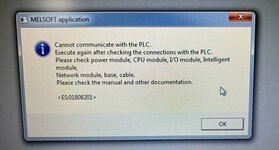
Ich habe an einer Maschine eine Mitsubishi A2SHCPU. Diese hat auf einmal den Geist aufgegeben und verbindet sich nicht mehr. In der HMI wird nur angezeigt, dass keine Verbindung aufgebaut werden kann. An der CPU leuchtet die ERROR-LED, die RUN-LED blinkt. Verbindung mit dem GX-Developer kann ich auch nicht aufbauen, auch hier gibt es Probleme mit der Kommunikation.
Am Setup vom GX-Developer kann es eigentlich nicht liegen, da ich die gleiche Konfiguration an einer anderen Maschine getestet habe, an der ebenfalls eine A2SHCPU verbaut ist. Hier hat die Verbindung ohne Probleme funktioniert.
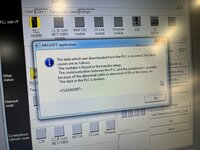
Bei der Verbindung mit der kaputten Maschine kam im GX-Developer ebenfalls die Nachricht, dass die Daten auf der PLC nicht korrekt sind, bzw defekt.
Ich habe versucht, die CPU mit einem alten Modell zu tauschen, welches wir noch auf Lager hatten, leider ist das Fehlerbild hier das Gleiche.
Kann mir hier jemand bei der Behebung helfen, ich kenne mich leider nicht mit Mitsubishi aus.
- Sind die Daten nur verloren gegangen und lassen sich durch ein altes Backup neu einspielen?
- Oder ist die CPU kaputt und muss ersetzt werden?
Danke im Vorraus!
Ich habe an einer Maschine eine Mitsubishi A2SHCPU. Diese hat auf einmal den Geist aufgegeben und verbindet sich nicht mehr. In der HMI wird nur angezeigt, dass keine Verbindung aufgebaut werden kann. An der CPU leuchtet die ERROR-LED, die RUN-LED blinkt. Verbindung mit dem GX-Developer kann ich auch nicht aufbauen, auch hier gibt es Probleme mit der Kommunikation.
Am Setup vom GX-Developer kann es eigentlich nicht liegen, da ich die gleiche Konfiguration an einer anderen Maschine getestet habe, an der ebenfalls eine A2SHCPU verbaut ist. Hier hat die Verbindung ohne Probleme funktioniert.
Bei der Verbindung mit der kaputten Maschine kam im GX-Developer ebenfalls die Nachricht, dass die Daten auf der PLC nicht korrekt sind, bzw defekt.
Ich habe versucht, die CPU mit einem alten Modell zu tauschen, welches wir noch auf Lager hatten, leider ist das Fehlerbild hier das Gleiche.
Kann mir hier jemand bei der Behebung helfen, ich kenne mich leider nicht mit Mitsubishi aus.
- Sind die Daten nur verloren gegangen und lassen sich durch ein altes Backup neu einspielen?
- Oder ist die CPU kaputt und muss ersetzt werden?
Danke im Vorraus!