


Lars Weiß
Level-3
- Beiträge
- 1.339
- Reaktionspunkte
- 301
-> Hier kostenlos registrieren
Ich bin da grad etwas ratlos. Neues NB, Win11pro, alles aktuell. Step7 Classic 5.7 SP3 HF1 installiert, keine PG/PC-Schnittstelle:
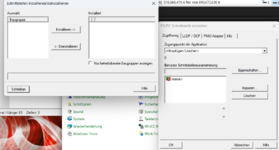
Danach TIA V19 UPD5 installiert, gleiches Spiel. Forum durchsucht, den Hack unter:
C:\Program Files\Common Files\Siemens\Automation\Simatic OAM\bin
alles zu löschen und dann s7epaIMP64.exe ausführen probiert, kein Erfolg.
Hat die Schwarmintelligenz vielleicht eine Idee ?
Danach TIA V19 UPD5 installiert, gleiches Spiel. Forum durchsucht, den Hack unter:
C:\Program Files\Common Files\Siemens\Automation\Simatic OAM\bin
alles zu löschen und dann s7epaIMP64.exe ausführen probiert, kein Erfolg.
Hat die Schwarmintelligenz vielleicht eine Idee ?


