Zuviel Werbung?
-> Hier kostenlos registrieren
-> Hier kostenlos registrieren
Hi everyone,
I am troubleshooting a Siemens S7-400 system and have run into a critical issue where I cannot establish any communication with the CPU.
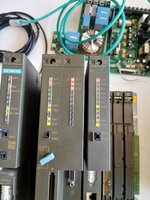
Current Hardware Setup:
Power supply: PS 407 4A (6ES7 407-0DA02-0AA0)
CPU: CPU 416-2DP (6ES7 416-2XL01-0AB0)
Communication Processor: CP 443-1 (6ES7 443-1EX11-0XE0)
Current Status & Symptoms:
CPU Status: The physical mode switch is currently set to RUN-P, but the CPU is stuck in solid STOP (yellow LED). Additionally, the INTF (Internal Fault), EXTF (External Fault), and BUSF (Bus Fault) LEDs are all solid red.
CP 443-1: No fault LEDs are on, but it is in STOP mode, mirroring the CPU status.
The Main Problem:
I am completely unable to connect to the CPU to read the Diagnostic Buffer. I am using an official Siemens PC Adapter USB to connect via the MPI port.
When I try to search for the CPU using "Accessible Nodes" in Simatic Manager (Step 7 Classic), no nodes are detected at all. I have already tried:
Checking the PG/PC Interface settings (set to PC Adapter MPI, tried default 187.5 Kbps baud rate, and tried changing local PG address to 0).
Switching the PG/PC Interface to PROFIBUS (1.5 Mbps) and connecting to the X2 (DP) port.
The "Accessible Nodes" window still comes up completely blank in both cases.
Since the backup battery is dead (BAF/BATTF are active), I suspect the internal RAM memory might be corrupted, or the communication ports have locked up due to the severe internal/external faults. Backing up the current program is not a priority right now; my main goal is just to break the communication lock and establish an online connection to see what is failing.
Has anyone experienced this specific lock-up state on an older S7-400 CPU? Will performing a physical memory reset (MRES) via the toggle switch help restore the default MPI communication parameters (Address 2, 187.5Kbps) so I can connect, or does this look like a permanent hardware/ASIC failure on the CPU board?
Any advice or troubleshooting steps would be greatly appreciated.
Thanks in advance!
I am troubleshooting a Siemens S7-400 system and have run into a critical issue where I cannot establish any communication with the CPU.
Current Hardware Setup:
Power supply: PS 407 4A (6ES7 407-0DA02-0AA0)
CPU: CPU 416-2DP (6ES7 416-2XL01-0AB0)
Communication Processor: CP 443-1 (6ES7 443-1EX11-0XE0)
Current Status & Symptoms:
CPU Status: The physical mode switch is currently set to RUN-P, but the CPU is stuck in solid STOP (yellow LED). Additionally, the INTF (Internal Fault), EXTF (External Fault), and BUSF (Bus Fault) LEDs are all solid red.
CP 443-1: No fault LEDs are on, but it is in STOP mode, mirroring the CPU status.
The Main Problem:
I am completely unable to connect to the CPU to read the Diagnostic Buffer. I am using an official Siemens PC Adapter USB to connect via the MPI port.
When I try to search for the CPU using "Accessible Nodes" in Simatic Manager (Step 7 Classic), no nodes are detected at all. I have already tried:
Checking the PG/PC Interface settings (set to PC Adapter MPI, tried default 187.5 Kbps baud rate, and tried changing local PG address to 0).
Switching the PG/PC Interface to PROFIBUS (1.5 Mbps) and connecting to the X2 (DP) port.
The "Accessible Nodes" window still comes up completely blank in both cases.
Since the backup battery is dead (BAF/BATTF are active), I suspect the internal RAM memory might be corrupted, or the communication ports have locked up due to the severe internal/external faults. Backing up the current program is not a priority right now; my main goal is just to break the communication lock and establish an online connection to see what is failing.
Has anyone experienced this specific lock-up state on an older S7-400 CPU? Will performing a physical memory reset (MRES) via the toggle switch help restore the default MPI communication parameters (Address 2, 187.5Kbps) so I can connect, or does this look like a permanent hardware/ASIC failure on the CPU board?
Any advice or troubleshooting steps would be greatly appreciated.
Thanks in advance!