Step 7 generate a 1s pulse

larry

Level-2
Beiträge
59
Reaktionspunkte
1
What's the best way to generate a 1s pulse in a PLC program? The first way is to use a clock memory with rising edge instructions, and the second way involves using logic instructions like AND, OR, and NOT to handle the clock memory. I'm using STEP7.
 
What's the best way to generate a 1s pulse in a PLC program?
You mean a single pulse that starts at an event?

The easiest way is to use an S7 timer: S_PULSE (S_IMPULS) or S_PEXT (S_VIMP).
You can also create the pulse with S_ODT (S_EVERZ), but that requires a few more AND/OR operations. If you use S_OFFDT (S_AVERZ), the pulse will be 1 second + 1x the OB1 cycle time, or you can keep the timer active and let the trigger bit drop when the event occurs.

Another way: In OB1 you can add #OB1_PREV_CYCLE until >= 1000 (ms).

By the way: There's a CPU clock flag %Mx.7 that's exactly 1 second long and has a 1 second pause. Unfortunately, you can't control when the pulse starts. The same problem when using a cyclic OB.
 
You mean a single pulse that starts at an event?

The easiest way is to use an S7 timer: S_PULSE (S_IMPULS) or S_PEXT (S_VIMP).
You can also create the pulse with S_ODT (S_EVERZ), but that requires a few more AND/OR operations. If you use S_OFFDT (S_AVERZ), the pulse will be 1 second + 1x the OB1 cycle time, or you can keep the timer active and let the trigger bit drop when the event occurs.

Another way: In OB1 you can add #OB1_PREV_CYCLE until >= 1000 (ms).

By the way: There's a CPU clock flag %Mx.7 that's exactly 1 second long and has a 1 second pause. Unfortunately, you can't control when the pulse starts. The same problem when using a cyclic OB.
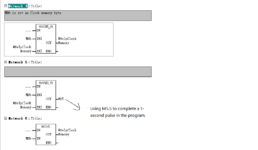
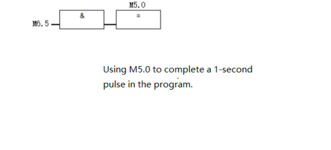
In the PLC program, we often use the method from 1.png to generate 1-second pulses, while the method in 2.png is only used in OB35.

What are the advantages of using the method in 1.png?
 

Anhänge

  • 1.png
    1.png
    13,5 KB · Aufrufe: 35
  • 2.png
    2.png
    6,1 KB · Aufrufe: 34
You mean a single pulse that starts at an event?

The easiest way is to use an S7 timer: S_PULSE (S_IMPULS) or S_PEXT (S_VIMP).
You can also create the pulse with S_ODT (S_EVERZ), but that requires a few more AND/OR operations. If you use S_OFFDT (S_AVERZ), the pulse will be 1 second + 1x the OB1 cycle time, or you can keep the timer active and let the trigger bit drop when the event occurs.

Another way: In OB1 you can add #OB1_PREV_CYCLE until >= 1000 (ms).

By the way: There's a CPU clock flag %Mx.7 that's exactly 1 second long and has a 1 second pause. Unfortunately, you can't control when the pulse starts. The same problem when using a cyclic OB.
2.png is incorrect, new_2.png is correct.
 

Anhänge

  • new_2.png
    new_2.png
    858 Bytes · Aufrufe: 24
You mean a single pulse that starts at an event?
You didn't answer my question. What do you need the pulse for? Or a cyclical clock?

The clock bits of the CPU clock memory byte are asynchronous to events from the process and asynchronous to OB1.
The clock bits can simply be used as a flashing clock for lamps or to count seconds, but not for a pulse that must start when an event occurs.
 
The clock bits can simply be used as a flashing clock for lamps or to count seconds, but not for a pulse that must start when an event occurs.
Example:
Code:
                 +---+     #out
"clockbit_1Hz" --| & |     +---+
    "condition"--|   |-----| = |
                 +---+     +---+
If the condition becomes true then #out will be
- either true immediately, but for less than 0.5s
- or true up to 0.5s later, but then for exactly 0.5s

---> #out is not synchronous with the condition
 
你没有回答我的问题。您需要 pulse 做什么?还是一个周期性的时钟?

CPU clock memory 字节的 clock bits 与来自进程的事件异步,并与 OB1 异步。
clock bits 可以简单地用作 lamps 的闪烁时钟或计算秒数,但不能用于事件发生时必须启动的脉冲。
Generate a continuous 1-second pulse without interruption. For example, when the fault wait time for the valve adds up to 3 seconds, a failure alarm is triggered.
However, in the PLC project, the clock memory byte is completed with logical instructions (e.g., XOR and AND) to generate a 1s pulse.
 
Zurück
Oben